Image optimization and caching on Astro and Vercel
What I changed so the images on my personal site show up straight away instead of as blank tiles: build-time imports, resizing, modern formats, loading hints and the cache headers underneath.
My personal site has a lot of pictures on it. There’s a carousel of clothes, shoes and fragrances I’m into at the moment, which I call the rotation, a page that lists all of them, and a shelf of the books I’m reading.
What I didn’t want was blank tiles. You open the page, the layout is there, and the image slots sit empty for a moment before things pop in one at a time. On a page that’s mostly pictures, that moment is most of the first impression. I’d never actually checked how any of these images were being served, so I asked Claude Code to go through it with me. What were the headers saying, how big were the files, and what would Astro and Vercel do for me if I let them?
There was more to fix than I expected, including a cache header the Vercel adapter sets and Vercel never applies.
Look at the headers first
Before touching any code, Claude Code ran curl -I against one of the rotation images:
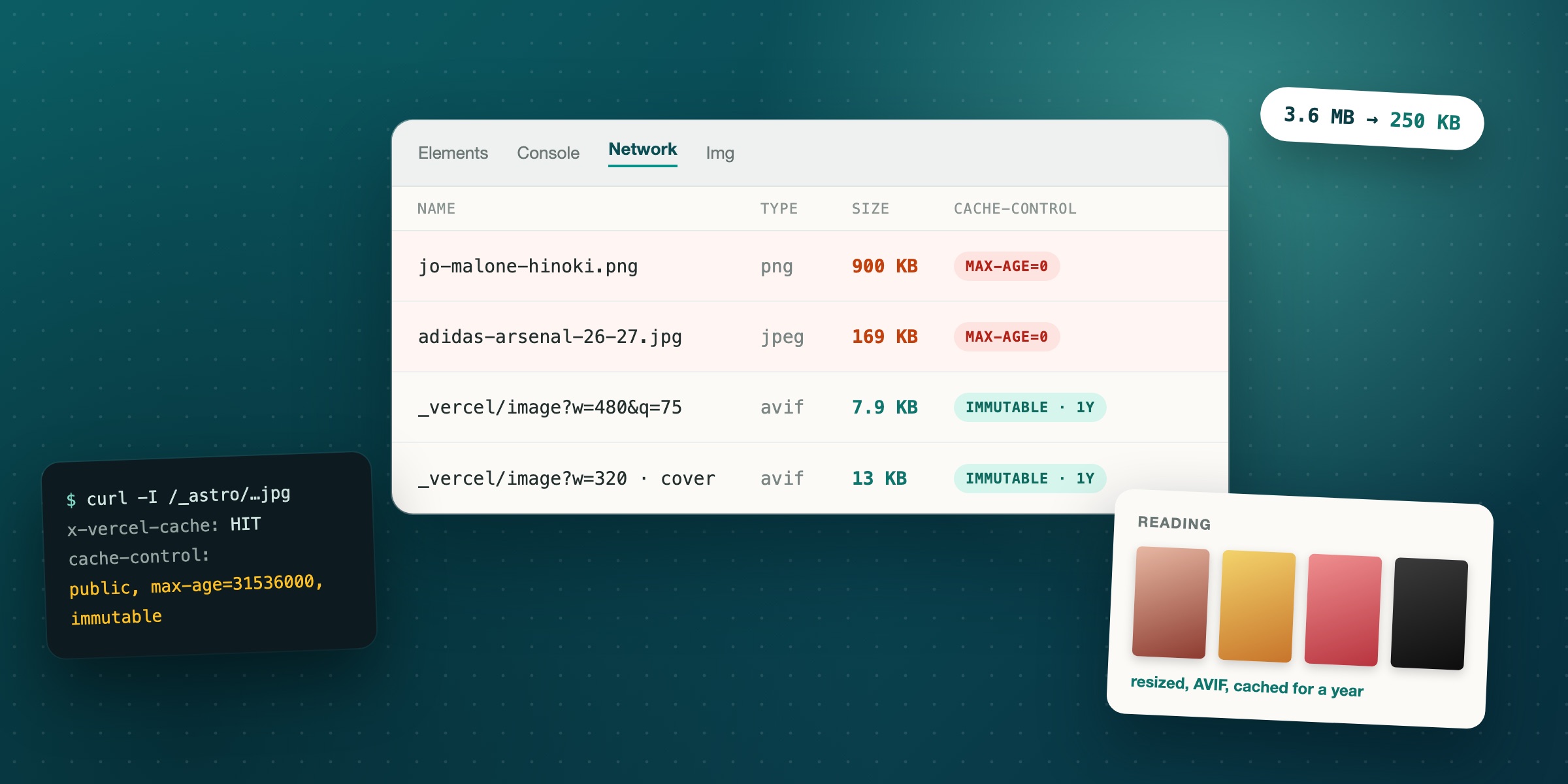
/images/rotation/scents/byredo-mojave-ghost-absolu.jpgcache-control: public, max-age=0, must-revalidatecontent-length: 152330My site told the browser to keep the image for zero seconds and check with the server again on every visit. That’s Vercel’s default for anything in public/, and it makes sense for files that might change under the same name. It doesn’t make sense for a photo of a perfume bottle.
That was the first of three things to fix. The second was size. Every image in the rotation was a full-size original. The Jo Malone bottle was a 900 KB PNG and a pair of Birkenstocks was 510 KB, and the carousel shows each one at 240 pixels wide. Most of every download was pixels nobody would see.
The third was that the carousel images were loading="lazy". That’s normally the right call, but these sit in a horizontal scroller near the top of the page. The browser treated the slides you couldn’t see yet as not urgent, so you’d swipe to one and get an empty tile.
Let the build own the images
The fix for the first two is the same move. Astro doesn’t process files in public/. It copies them as they are. So the rotation images moved to src/assets/rotation, and the data file imports each one:
import byredoMojaveGhostAbsoluImage from "@/assets/rotation/scents/byredo-mojave-ghost-absolu.jpg";
export const rotationItems: RotationItem[] = [  {    name: "Mojave Ghost Absolu",    brand: "Byredo",    image: byredoMojaveGhostAbsoluImage,    // ...  },];
That’s 22 import lines at the top of a data file, which looks a bit silly. It also means a typo in a filename fails the build instead of shipping an empty tile, which I’ll take.
At build time, each file gets a content hash in its name, like adidas-arsenal-26-27-stadium.TUpQtofW.jpg. If I ever replace the photo, the hash changes and so does the URL. That’s what makes it safe to cache the old URL forever.
Resize at the edge
The site is server-rendered on Vercel, so for resizing I turned on the adapter’s image service. It hands every <Image> to Vercel’s image optimizer, which resizes on the first request, picks AVIF or WebP from what the browser says it accepts, and keeps the result at the edge:
adapter: vercel({ imageService: true, imagesConfig: { sizes: [320, 480, 640, 720, 960], formats: ['image/avif', 'image/webp'], minimumCacheTTL: 2678400, },}),The components then ask for the widths they need and tell the browser how wide the image will actually be on screen:
<Image src={item.image} alt={`${item.brand} ${item.name}`} widths={[320, 480, 720]} sizes="240px" quality={75} loading="eager"/>That turns into an srcset, and the browser picks the smallest file that’s still sharp on its screen. A 1x screen gets the 320, a 2x laptop gets the 480, and a 3x phone gets the 720.
The adapter’s image service sets quality to 100 if you don’t pass one. Not “a sensible default”, literally 100. If you turn this on and your images somehow get bigger, that’s probably why.
The widths you ask for also have to be in the sizes list. A single width gets snapped to the nearest configured size, but anything in widths that isn’t in the list is quietly dropped from the srcset. Nothing breaks. In the carousel, a 3x phone would just get a blurrier image.
The 720 is there because of a reviewer agent. I have a fresh agent review every diff before I ship it, and this one did the maths on a 240 px slide on a 3x phone. It pointed out that my config comment claiming “1x to 3x screens” wasn’t true without it.
Don’t lazy-load what’s about to be seen
The carousel switched to loading="eager". It’s six images, and after resizing they’re small enough that loading them all up front costs less than an empty tile when someone swipes. The full rotation page keeps the first row eager and lazy-loads the rest, because most of those really are further down the page.
The cache header that wasn’t there
Then I deployed it and checked the headers again:
/_astro/adidas-arsenal-26-27-stadium.TUpQtofW.jpgcache-control: public, max-age=0, must-revalidateSame as before, on a file with a content hash in its name. The whole point of the hash is that you’re allowed to cache it for a year.
The Vercel adapter does try to set that header. It writes a route into .vercel/output/config.json saying anything under /_astro/ gets max-age=31536000, immutable. But it writes that route after the {"handle": "filesystem"} step, and Vercel serves static files at the filesystem step. Any real file is answered before the header rule is ever read. The rule only ever applies to paths that don’t exist.
The fix is a few lines in vercel.json. Vercel applies those headers before it gets to the filesystem:
"headers": [ { "source": "/_astro/(.*)", "headers": [{ "key": "Cache-Control", "value": "public, max-age=31536000, immutable" }] }]After that deploy, both the original file and the optimized AVIF came back with a one-year immutable cache, and x-vercel-cache: HIT from Vercel’s edge. A repeat visit doesn’t ask the server anything. The images are just there.
On the way I also had a scare where the optimized image returned a 400. That one was ours. The URL had been scraped out of the HTML, where & is written as &, and the test request sent it like that. The image was fine, the curl wasn’t.
The numbers
Once it was all live, the Arsenal shirt in the carousel went from a 169 KB JPEG to a 7.9 KB AVIF. In local testing the rest of the carousel came in between 4 and 13 KB, and the full rotation page, all 22 items, pulled about 250 KB of images. The originals added up to 3.6 MB.
Book covers
With the rotation sorted, the book covers were next. They were full-size JPEGs from Open Library, most of them behind two redirects to archive.org, so the shelf showed blank rectangles while they came through.
The obvious move was to send them through the same optimizer as remote images. Astro lets you allow remote hosts with image.remotePatterns, and the Vercel adapter passes the same list on to Vercel. One thing to know if you try it is that the list has to go in Astro’s own image config, not only the adapter’s imagesConfig, or the dev server rejects every remote image even though the Vercel config allows them.
Most covers came through that way. One never did, and Astro’s dev image endpoint returned a 500 for it on every request. Maybe Vercel’s optimizer would have coped, but a cover that might 500 in production is worse than a slow one.
So the covers go through the same pipeline as the rotation. They’re hashed, resized, served as AVIF where the browser supports it, and cached for a year. A cover now comes down as a 13 KB AVIF instead of a 31 KB JPEG behind two redirects.
Where it ended up
The rotation shows up when the page does, and the bookshelf is a few KB per cover. The images are sized for the screen they land on, the formats are whatever the browser handles best, and the URLs change when the content does, so the browser can keep them for a year without asking.
It isn’t free in every sense. Vercel’s image optimization counts towards your plan’s usage. For 22 photos and ten covers that’s a rounding error, but it won’t be for a site with thousands of product shots.
None of this is new. Astro and Vercel document most of it. But nothing on the page ever looked broken, just slow. The default for files in public/ is to check every time, the adapter’s own cache rule was quietly not applying, and the only way to know was to ask the server what it was actually sending. That’s the habit I’m keeping. Before optimizing anything, run curl -I and read the headers.